Behind The Scene Of How Browser Render Website

I have joined and started learning Software development with ChaiCode Web dev Cohort 2026 and very excited😊
A Web browser a.k.a browser (Chrome, Edge, Firefox, Safari) used by people daily to visit websites, read news , watch videos on Youtube, reading documents, resources on Wikipedia and many more. s, it is used to show the resources what user want to to see/choose . It is like window, you can see through window just like that browser render the requested resources on screen (Browser Window).
Overview
Browser load files , convert into raw bytes (0,1), character encoding (utf-8), tokenization(h1,p,html,body), relation between element (parent,child), formed nodelist , create DOM . on parallel CSS also parsed , CSSOM created , merged DOM and CSSOM formed Render Tree, browser calculate size and position of element on render tree, painted into pixels and finally render on screen. JS →DOM when JS comes before DOM then first JS load and execute so it takes more priority but when CSSOM ←JS .JS executes halted until the CSS get ready.
How Browser Render Website Behind The Scene
All the browsers have some common UI like
Address Bar for inserting URL
back and forward button
Bookmark button
Reloading and Stopping button to reload and stop the current documents
Home button that brings to Home page
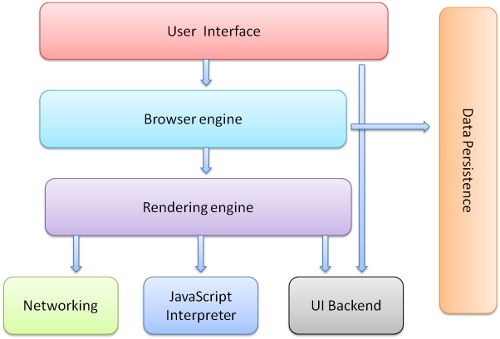
High Level Overview of Browser
The main components of browser are :
1 . The User Interface : it includes the UI part of browser. address bar , bookmark button , back/forward button, reload and stop button, homepage redirect button .
2 . Browser Engine : it is middleman of browser. It is like traffic controller. every instruction is pass through Browser engine. it gives the required instruction to required part of browser (dispatcher). like when user type URL then it tells networking layer for make network request to fetch the requested resources and then it gives to rendering engine. some are :
**Blink (**Chrome, Edge, Brave , new version of Opera)
Webkit (Safari)
Gecko (Mozilla FireFox)
3 . Rendering Engine : it is responsible for displaying requested data on screen. suppose the request is show webpage then first it parse HTML, CSS and then display the parsed content on screen.
4 . Networking : it is responsible for network calls. like HTTP request .
5 . Javascript Interpreter : It parse and execute scripts, Javascript code .
6 . UI backend : It manages the UI of browser like where to show menus , back and forward button , Bookmark button , extensions and also it captures the events like mouse click, scrolls. It uses operating system Interface. for eg : when user click back button then it capture the click event and pass to browser engine and browser engine pass this to rendering engine and then rendering engine shows previous content.
7 . Disk Api : it is data persistence layer . it includes local storage, session storage. It is used to store some pieces of information in the form of cookies or session.
HTML
User use browser to request the resources they want. browser request server for response. server can send text, file, json, image, video, audio etc. server send response on the basis of request. but how user can request for resources . for this WWW is created.
WWW (World Wide Web ) is standards that is proposed to define the way to share and get data from server. It did three things
HTTP : http is created . it is used to get the data from server without accessing server. it is used to transfer resources from client to server and vice-versa . it works on application layer. it is used to make request of data from server.
HTML : HTML is Markup language that is used to structure the webpage. without html , there is no structure of documents and which makes user more difficult to read and understand the resources so HTML gives tags that gives some meaning and structure and some visual representation on screen.
URL Format : It define the way in which request can be done . like https://chaicode.com, https://dipeshchaudhary.name.np . whatever the resources to fetch define the URL in proper format.
Tim Berner Lee want to make some type of formatting Language that is used to define the writing way of documents because all the documents are in text format and also server responds back text response and when it render into screen it looks messy , not user friendly. it is more difficult to understand what are the heading and more important message of documents. so He created HTML which includes many tags that are used to define proper structure for documents and when it store on the server and when browser requested the documents , the server responds back with text in format of HTML . after that It renders on the screen .
HTML does three things :
1 . It makes the documents looks good.
2 . It provides proper meaning and structure of webpage.
3 . It includes hyperlink to link other resources inside one resource.
Structure Of Tag
Tag has following structure:
1 . Opening Tag : it is opening of tag . it use angular brackets <>
2 . Closing Tag : It use </> to close tag .
There are two types of Tag :
a. Paired Tag : it comes into pairs of opening and closing tag. like <p></p>, <h1></h1>,<div></div>
b. Unpaired Tag : it only comes with opening tag . it is also known as empty tag. like <br>, <hr>
c. Self closing tag : the unpaired tags which used slash (/) at the end of opening tag to self closed . like <img /> , <input /> which is most common in react or XHTML
The complete structure of tag is called element .it includes starting tag, optional content , and closing tag like <p>This is paragraph </> . on complete way it is called paragraph element.
<p>Hi I am Paragraph Tag </p>
The Hyperlink make another call to sever for resource in format of like https://docs.chaicode.com.
Tags are predefined element which are used to structure webpage like
1. for big and bold heading use h1 . it has 6 variants from h1-h6
2 . for paragraph and text use p tag
3 . to display image use img
4 . to display audio and video use audio and video tag
5 . for hyperlink use anchor tag which is a
There are attributes used in tag , it provides look and behavior of tag . it is define inside opening tag and typically looks as name = “value” format
<a href="https://chaicode.com" target="_blank">chaicode</a>
<img src="logo.png" alt="Logo of company" width="200" height="100">
When browser request through http to get homepage of chaicode.com then it request through URL like http://chaicode.com. The server does not understand that it want html format of text so browser also send additional information to sever which is called headers .there is Content-Type : text/html so that server responds back the html to the browser and browser render the html into screen.
How Browser Render HTML
When browser receive HTML as response from server . The server respond back with Content-Type : text/html . then the browser start the following process behind the scene :
1 . Parsing : implementation of rules to make the code understandable for browser. the raw HTML and CSS parsed and construct the tree which is understandable for browser to render on screen. It has one works to form DOM Tree . There are two types of parsing :
a . Conventional Parsing : CSS and Javascript are parsed by Conventional Parsing
b . Unconventional Parsing : HTML is Unconventional Parsing
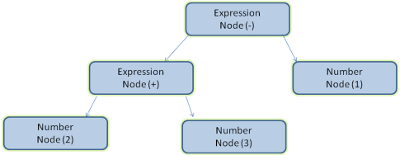
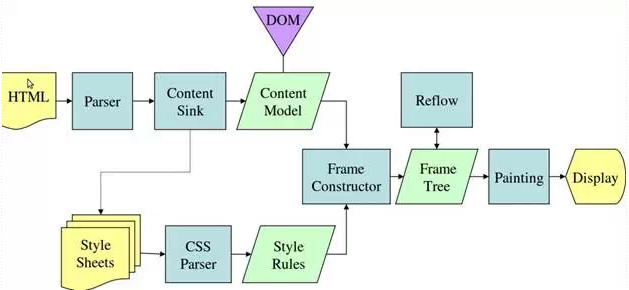
The following steps involves in rendering webpage :
1 . Building DOM : The browser start by fetching HTML by HTTP Request. it tokenizes the element and form DOM Tree which contains content of page and hierarchy of element . It can be modified by using Javascript.
2 . Creating CSSOM : In parallel , Browser fetches the css files and start to create CSSOM . This tree maps styles the elements. The parsing of HTML stops until the CSSOM is ready. so optimizing CSS files by media or using preload can speed up the rendering process.
3 . Generating Render Tree : The DOM and CSSOM are merged to form render tree . It only includes visible elements with computed styles . The <meta> and display:none elements are excluded.
4 . Constructing Frames : Frame are constructed on the basis of Render Tree . It is like rectangular object for each element/node.
5 . Layout (Reflow) : the browser calculates the exact size and position on the basis of CSS Box model(flexbox, css grid). Any Dom or styles change trigger the Reflow which are costly on performance. It is more computational or calculation heavy task.
**6 . Painting :**The render tree painted into pixels. then the browser apply color, border, shadow , images . complex effects like gradients can slow this process. It is more related to visuals like creative side of determining color, border, image etc.
7 . Rendering : This is displaying the render tree on screen.
Why There is www before domain name in URL
WWW is standard and it reflect that the response coming back from server is html format so It obvious the user that the requesting data comes about the webpage that will bring the webpage. so there is www used in URL when to make website call or when we need HTML response from server.
like https://www.chaicode.com it gives landing page of most useful and beautiful Chaicode website. and Server who return html response is called web server.
Summary
Browser is so powerful and it is OS in itself. There are so many layers which work together to run the applications, software efficiently and smoothly .This was the the overview of the browser internal how browser make call the http request to the server and server responds back as the response on the basis of requested data and then the browser look to the header where there is Content-Type then the rendering process start . first parsed HTML and CSS to create render tree and then the browser create frame and do the process of reflow and painting means showing in pixels and then finally the webpage of website got render n he screen . Through Browser Most of people are connected to Internet.
More Resources :

